Introducing Range Expander
Before I owned a case, a power supply, or a single overpriced module, I got into modular synthesis the way a lot of people do now: through VCV Rack, the free software modular. Lots of bleeps and bloops. Completely different from my usual DAW workflow, but amazing for experimentation.
Somewhere in those late-night patching sessions, I had an idea for a module. It felt simple and useful enough that I was sure someone had to have already built it. I searched the VCV Library. I searched forums. I found modules that split, attenuate, offset, invert, quantize, and logic-gate a signal into oblivion. But I couldn't find one that did what I had in mind.
So I built it. Range Expander is my first VCV Rack module. It does exactly what I hoped it would do, which is "split voltages". But after using it myself for some time, I stumbled upon SO MANY other useful things it can do that I'm thinking about taking up electrical engineering just to make it an actual Eurorack module.
But this post is a guided tour of that one thing, "split voltages". If you've never touched a modular synth, don't worry. We're starting from "what's a volt."
The Tour
The panel beside the text is a live simulation of the panel, using the panel's actual math, running in your browser. And please do yourself a favor before you scroll any further: hit SOUND ON, right under the panel. Everything you're about to see, you'll also hear, and the whole story is better that way.
First, we have a classic, simple synth-y kinda sound. That sound goes into a "filter". Think of a filter as a knob that can make a sound "brighter" or "duller".
Here, we have a simple slider. Go ahead, grab it. That slider sends a voltage to the filter. Push it up, and the filter opens, making the sound brighter, more brassy and harsh. Pull it down, and the filter closes, making the sound calmer, muted, more relaxed.
Everything is a voltage. In a modular synth, cables don't carry "notes" or "settings". They carry signals, and a signal is just a number changing over time. Here, the slider sends control voltage, or "CV", to the filter.
In VCV Rack (and most of Eurorack), CV signals live between 0 and 10 volts. The wave on the scope is an LFO (a low-frequency oscillator) that slowly climbs to 10V and falls back to 0V.
What we're doing here is "patching" the LFO into the filter. You can think of CV almost like a little robotic hand, moving the slider for you. The filter automatically sweeps open and closed in time with it. Lovely!
But patch that LFO into three filters, and now you've got three robotic hands all making the exact same move at the same time. Copies, not a sequence. If you want first this filter, then that one, then the reverb, you need a stack of envelopes and a sequencer to conduct them. That's a lot of patching for "and then."
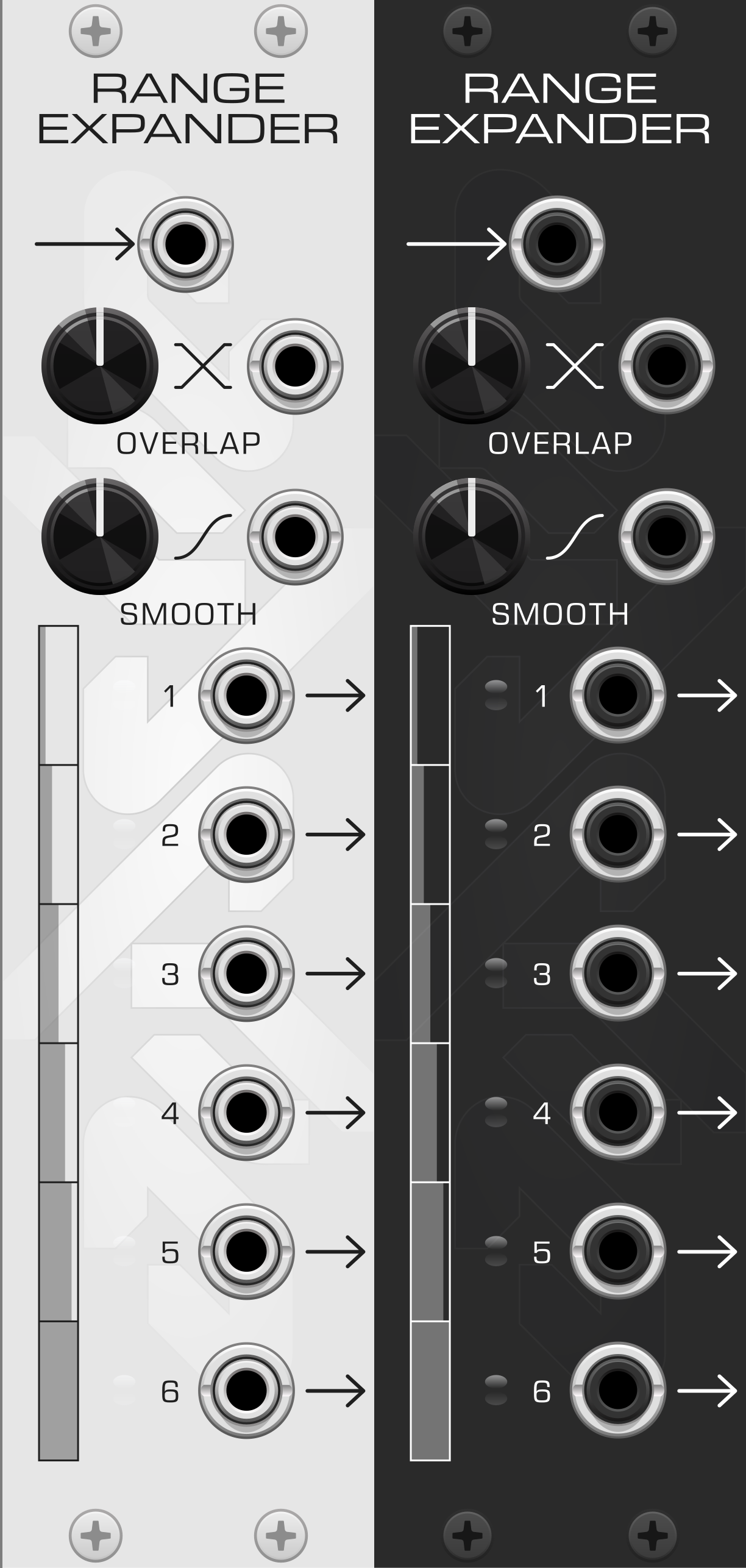
So here's the idea: what if you sliced up the range instead? Take the 0–10V span and deal it out like cards. Each connected output claims one slice. With all six patched, output 1 owns 0 to 1.7V, output 2 owns 1.7 to 3.3V, and so on up the stack.
The module re-deals automatically as you patch. Two cables? Two 5V slices. Plug in a third, and now it's 3 slices at 3.33V each. Only connected outputs count.
Each output treats its little slice as if it were the whole world, and rescales it to a full 0→10V sweep. Feed the input a slow rising ramp, and the outputs fire in sequence. Each performs a complete gesture inside its slice, then holds at the top while the next one takes over. Below its slice, an output rests at 0V. Above it, it holds at 10V.
One sweep in. A cascade out. This is the moment I knew I had to build it.
Hard slice boundaries give you clean hand-offs, great for switch-like moves. But sometimes you want the baton pass to be a blend.
That's the Overlap knob. It widens every slice toward both ends of the range, so neighbors share territory and crossfade through the transitions. At 100%, every slice covers the entire range and all six outputs become copies of the input. Everywhere in between is where it gets interesting.
The other knob is Smooth. Out of the box, each output's sweep is a straight line: honest, but stiff, like automation drawn with a ruler. Smooth bends it into an S-curve that eases in and out of every slice.
It's a morph, not a switch: 0% is fully linear, 100% is fully curved, and everywhere in between is a blend. (Both knobs take CV, so yes, you can modulate the modulation.)
Now it's yours. Drag the knobs. Unplug some outputs and watch the range re-deal itself. Set the input source to pointer and drag on the panel. You are the LFO now.
And if you've been reading in silence all this way: hit SOUND ON. Six voices, each output opening its own filter. That's a single sweep, of anything, conducting an entire ensemble.
Patch ideas
- Sequential filter sweep: one slow LFO into the input, outputs into filter cutoffs. The filters open one after another, forever, for free.
- Macro scene control: a single fader into the input becomes a scene morph, where each output brings in one voice or effect as you push it up.
- Cascading envelopes: one long envelope becomes staggered, per-voice articulation.
- Overlap as crossfader: with Overlap up, adjacent outputs hand off gradually. Pairs of outputs become crossfades between modulation destinations.
Where to get it
Range Expander is free and open source. Grab a build from GitHub, and here's the panel, light and dark, because the module themes with your Rack. That stack of slices running down the left side? That's the whole concept, printed on the faceplate:
It's a small module, and that's the point. Modular is full of giant do-everything monsters; I wanted to make the thing I kept reaching for and couldn't find. And if you build Eurorack hardware and want to steal this idea: steal it, it's GPL. I'd love to buy one.